About Us Services Solutions SCADA Clients Projects Contact
Product

SCADA

Process visualization and control for industrial plants โ€” reliable, scalable, and seamlessly integrated.

Why Skillworks SCADA?

Skillworks SCADA combines ease of use with high flexibility and modern architecture. The platform enables you to visualize complex systems quickly, integrate existing infrastructure seamlessly, and make processes transparent.

The web-based approach, open interfaces, and modular extensibility make Skillworks SCADA suitable for both new projects and integration into existing system landscapes.

๐Ÿ–ฑ๏ธ

Drag-and-Drop Interface

Create visualizations in minutes โ€” no programming knowledge required.

๐ŸŒ

100% Web-Based

No software installation needed. Available anywhere, directly in the browser.

๐Ÿ”—

MQTT Integration

Seamless connection to existing brokers and data sources via open interfaces.

๐Ÿญ

Industry-Independent

Ideal for logistics, manufacturing, intralogistics, and other industrial environments.

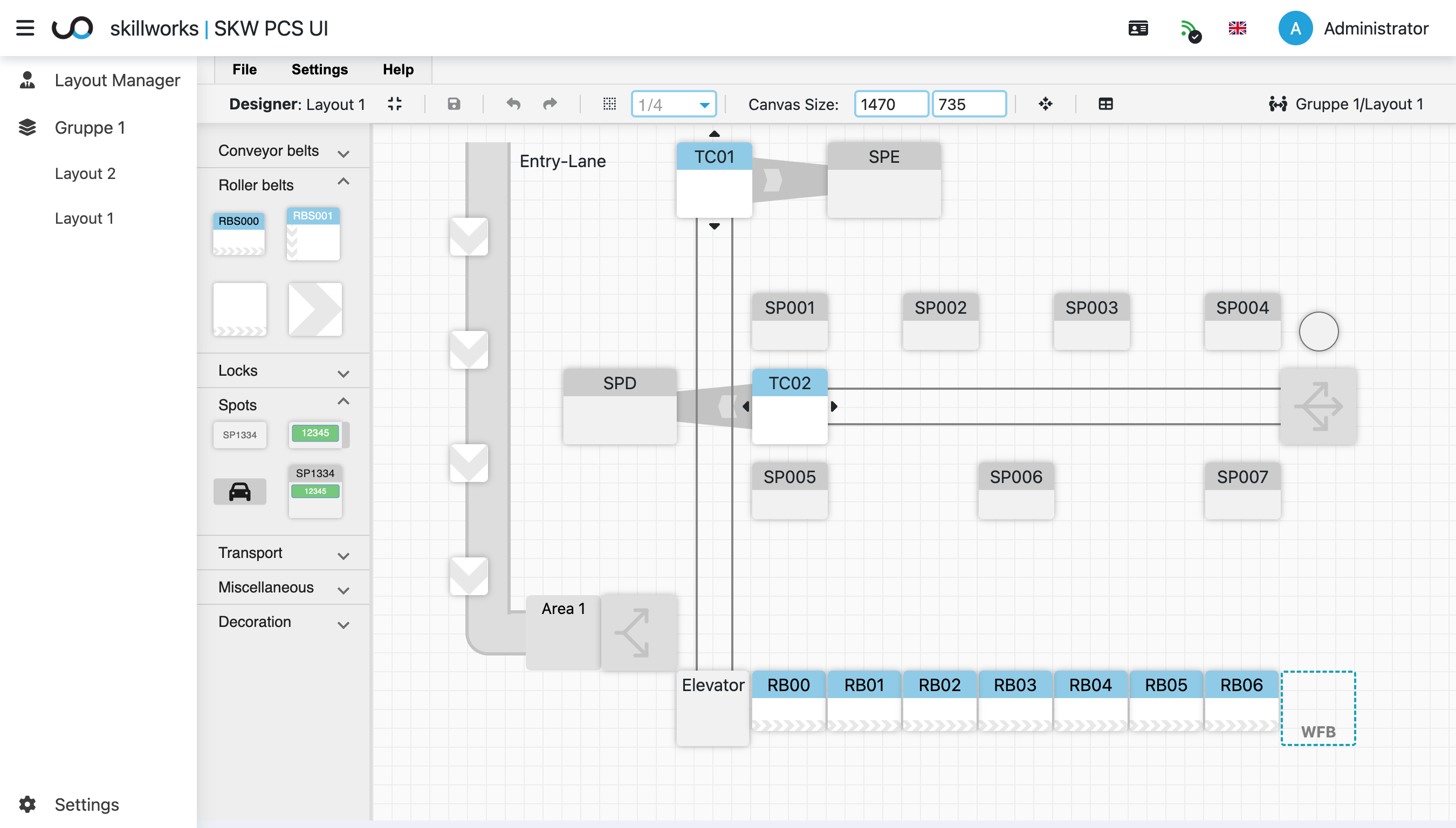
Skillworks SCADA Designer with drag-and-drop interface

Drag-and-Drop Designer โ€” assemble layouts intuitively

Visualize plants with drag-and-drop

The Designer lets you build layouts simply by dragging and dropping elements. The interface is clearly structured and offers a wide range of module types including conveyor technology, spots, and sensors.

Multiple users can work on the same model simultaneously โ€” changes made by others are visually highlighted in real time, enabling coordinated collaboration.

  • Comprehensive module library (conveyors, elevators, spots, sensors โ€ฆ)
  • Real-time collaborative editing by multiple users
  • Scalable canvas for complex plant structures
  • Undo/redo controls and multi-page navigation
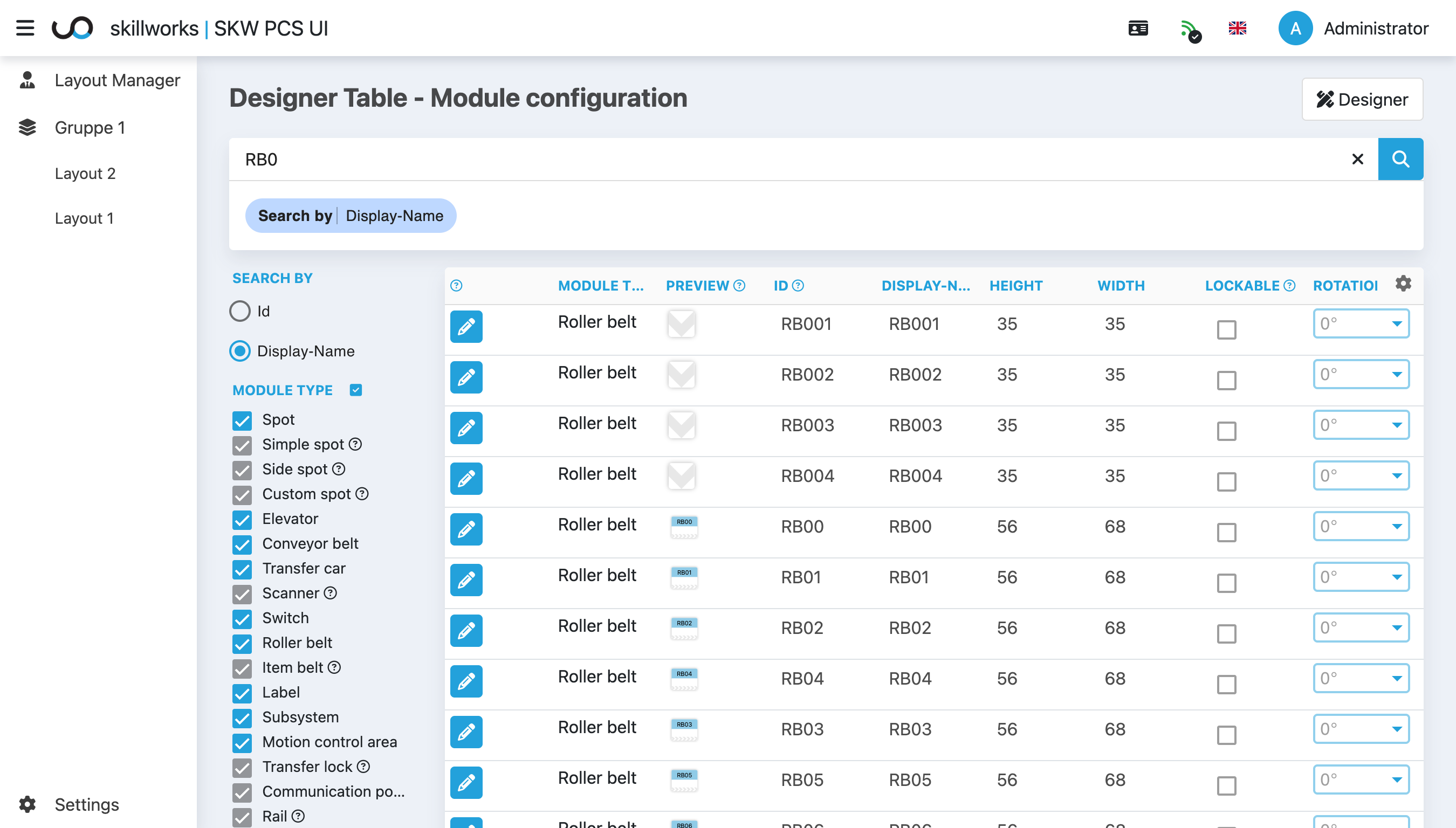
Designer table view for module configuration

Table View โ€” rapid bulk editing of module parameters

Tabular Module Editing

The table view enables quick editing of module parameters such as names, IDs, dimensions, and rotation. Perfect for efficiently managing large layouts with many elements.

Search, filter, and edit โ€” directly in the table, without having to select individual objects on the canvas.

  • All module types in a single, central overview
  • Filter by ID, name, and module type
  • Direct inline editing of parameters
  • Switch to the Designer with a single click
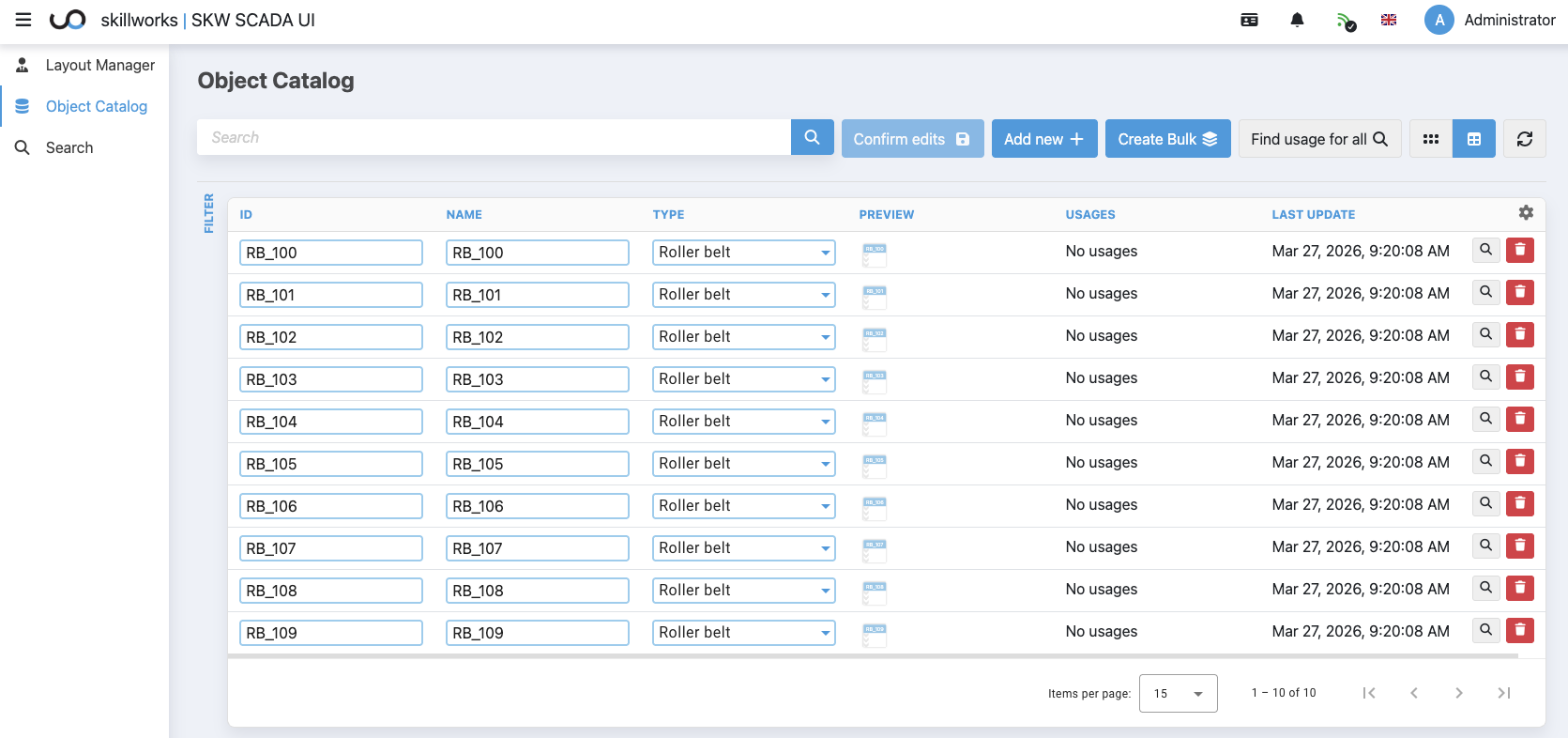
Central Object Catalog in Skillworks SCADA

Object Catalog โ€” define modules centrally and reuse them across layouts

Central Object Catalog

Skillworks SCADA features a central object catalog where modules can be defined and managed independently from individual layouts. These modules can be reused across layouts and maintained centrally.

Changes to an object automatically propagate to all associated visualizations โ€” ensuring a consistent and maintainable system architecture.

  • Reusable modules across multiple layouts
  • Centralized maintenance and updates
  • Reduced maintenance overhead
  • Higher consistency in large plant structures
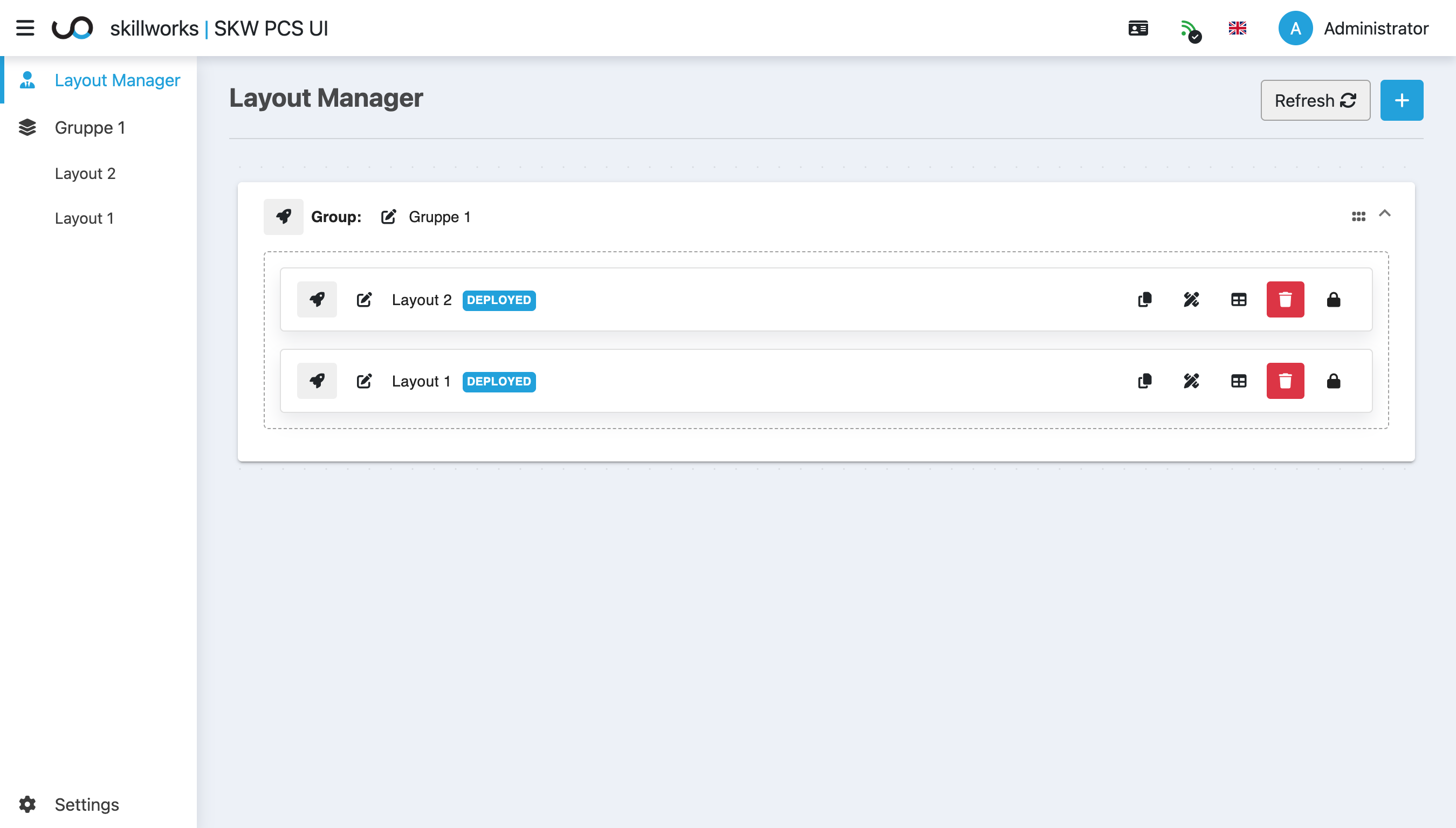
Layout Manager with deployed layouts

Layout Manager โ€” user roles and deployment status at a glance

Layout Manager & User Roles

Layouts are organized and published through the Layout Manager. Users with design rights can edit; all others access a productive live view. Skillworks SCADA can be integrated into existing central authentication services (CAS) for centralized user and permission management.

  • Group-based layout organization
  • DEPLOYED status and version tracking
  • Separate operator and designer views
  • CAS / SSO integration
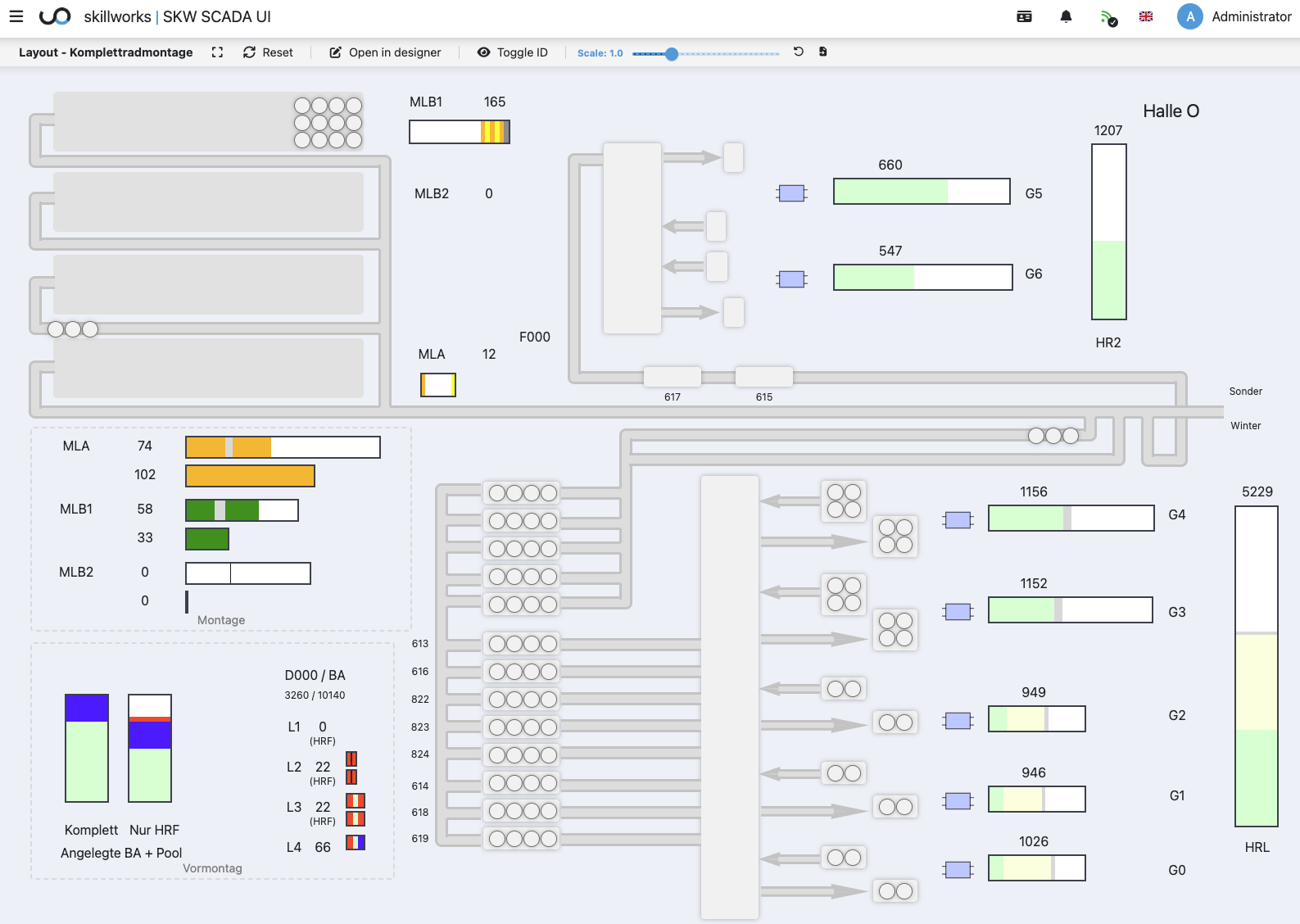
Live control room view with real-time material flow

Live View โ€” material flow and plant states in near real-time

Productive Live View

In the live view, control room operators see the current layout including material flow and plant states in near real-time โ€” entirely in the browser, without additional software.

Counters, status colors, and motion indicators provide a clear overview of the current operational state at all times โ€” the foundation for data-driven decisions.

  • Real-time plant status updates
  • Color-coded states and flow directions
  • Scalable view for large display walls
  • Basis for analytics & monitoring (Prometheus integration)
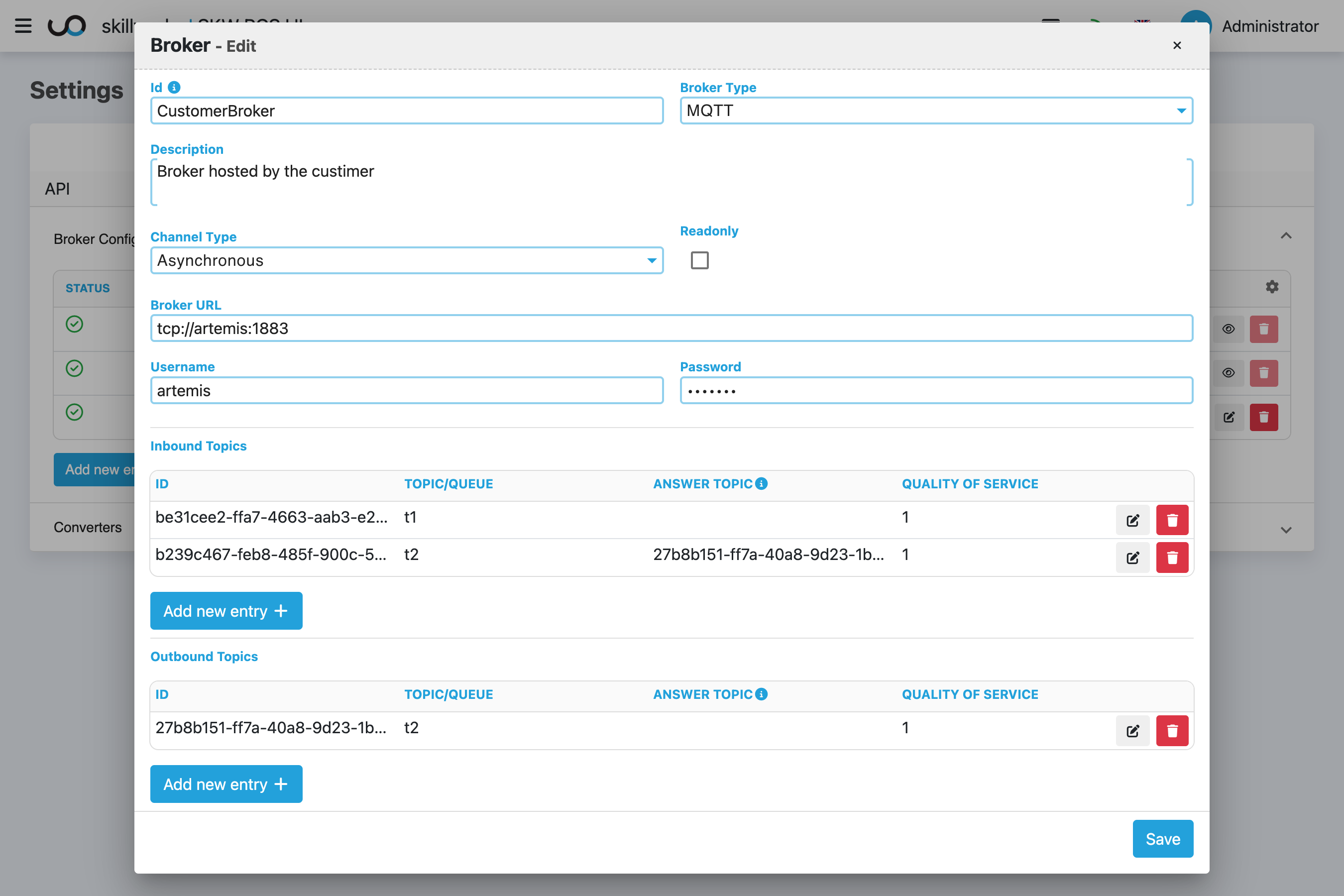
MQTT Broker configuration in Skillworks SCADA

MQTT Broker configuration โ€” connect existing brokers with ease

MQTT Integration & JOLT Conversion

Skillworks SCADA integrates seamlessly into existing infrastructure โ€” for example via customer-hosted MQTT brokers. The built-in JOLT converter transforms existing JSON message formats flexibly into the Skillworks data structure, without any changes to source systems.

Skillworks SCADA adapts to your data โ€” not the other way around.

  • Connect customer-hosted MQTT brokers
  • JOLT converter for flexible message transformation
  • Fast integration without modifying source systems
  • Retrofit-ready: gradually migrate legacy systems

Typical Use Cases

Skillworks SCADA is suitable for a wide range of industrial applications โ€” industry-independent and flexibly adaptable.

Material Flow Visualization

Transparently display and monitor conveyor and logistics systems.

Machine & Plant Monitoring

Monitor machine and plant states in real-time.

Sensor Data Integration

Connect sensor data and display it in a visually processed form.

Commissioning & Testing

Support plant commissioning and testing workflows.

Legacy System Retrofit

Gradually integrate legacy systems โ€” without immediate replacement.

Complex System Dependencies

Visualize interconnections and dependencies in a clear overview.

Coming Soon

Skillworks SCADA is continuously evolving. The following features are planned for the near future:

Interested in Skillworks SCADA?

Get in touch โ€” we'll show you the platform in a live demo and discuss how Skillworks SCADA fits into your system landscape.

Request a Demo